

Are you struggling with calculating WRP backpay for your team? You’re not alone.
With numerous rate changes, different award classifications and changes in WRP rates, it can be confusing to work out exactly what is owed and for what period.
This overview is designed to help approved providers – and anyone supporting them – understand how to correctly calculate WRP backpay for employees covered by the Children’s Services Award (CSA) or Educational Services (Teachers) Award (ESTA). It is particularly relevant for employees who applied for the Worker Retention Payment (WRP) prior to 30 September 2025 and opted in to receive backpay.
Please note this guide provides general guidance only and is not financial, payroll or legal advice.
Before you can calculate anything, you need to identify the employee’s award and classification, because the WRP is calculated off base award rates. This will ensure you determine the correct WRP hourly entitlement for each eligible employee and time period.
Define the below for each employee
- Whether they fall under the CSA or ESTA
- What their exact award classification is (for example, CSA Level 3.1, Level 4.2, ESTA Level 2
- Their employment type (full-time, part-time, casual)
Each classification has a specific WRP hourly amount for each period (pre–1 July, post–1 July and uplift periods). Providers should document the exact WRP hourly entitlements for the employee so these can be used consistently during backpay calculations.
We recommend you:
Use the ACA WRP Wage Calculator to confirm the correct WRP entitlement for each period or access the Department’s wage tables
- Record the WRP hourly amount for each applicable date range
- Keep these figures on file for future payments
For most providers, WRP backpay begins on 2 December 2024. The only exception is if your service opened after that date. In that case, your backpay would start from the date your service opened.
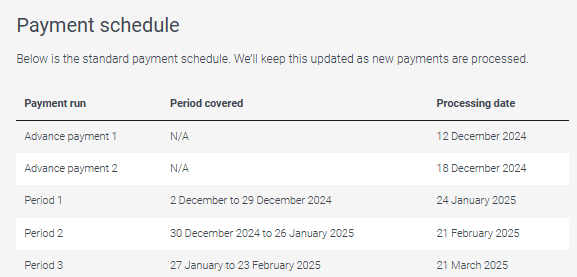
This shows you how far your backpayment needs to extend. To confirm this, check the Department’s payment schedule under the “When we make payments” tab.
Your backpay calculations should stop on the latter date of the "period covered" for specific your payment run.
For example: if you received your payment on or after 21 March 2025, you would be covered in the Period 3 payment run. Your back payment would cover period 2 December 2025 till the end of Period 3, 23 February 2025.
Depending on when your back payment was received, you may need to use more than one WRP hourly entitlement, for example:
- 2 December 2024 to 30 June 2025 (pre Annual Wage Review rates)
- 1 July 2025 to 30 November 2025 (post Annual Wage Review rates)
- 1 December 2025 onwards (5% increase)
You can look these up in the ACA WRP Wage Calculator or through the Department’s website.
WRP backpay applies to all paid ordinary hours and paid leave taken. This includes:
hours worked including overtime
- paid leave, such as annual leave, personal/carer’s leave and paid public holidays
If the employee received pay for the hour, the WRP applies. Split their paid hours and paid leave taken into the correct WRP periods.
Use this formula as a guide:
WRP owed for the backpay period = WRP hourly entitlement × eligible paid hours
Do this separately for each WRP period.
Once you’ve calculated each period, add them together to find the employee’s total WRP entitlement for the full back payment period.
Your WRP Funding Agreement requires providers to pass on WRP payments as soon as practicable after receiving the funds. Providers should ensure backpay is processed in a reasonable timeframe.
- Once backpay has been calculated and passed on, providers should turn their attention to ongoing implementation. WRP will need to be built into your payroll processes moving forward, and provisioned with your standard payment cycles to eligible employees.
·WRP must be applied to paid leave hours, including annual leave, personal leave and public holidays.
·Make sure award classifications are correct. Ensure any changes in award classification throughout your backpay period is noted and applied in calculations.
Only calculate backpay up to the date funded in your payment schedule.